

• Short guides to forum navigation, searching, posting, translation, alerts and notifications viewable by clicking here.
  • Türk dostlarımıza hoş geldiniz Giriş burada.
  • Scammers are running ads on Facebook and Instagram claiming a giveaway. DO NOT OPEN THESE LINKS AND LOG IN. See this thread: here
  • The Kinesis Community Forum will be down starting on Friday, Eastern Standard Time, and is expected to be back online on Monday. Big changes in the backend are coming!

Considerations for KMP (Kinesis Minting Program) participation

Background/Introduction
As outlined here, my take is that the KMP is a stepping stone on the way to the products/implementations that will generate significant fees to fuel yields.
https://forum.kinesis.money/threads/context-of-the-kinesis-minting-programme.3392/


Kinesis has produced a concise Whitepaper:

Here are the T&C of the KMP.


From these documents, we can see that a minter will incur the following costs
  • mint fee 0.45%
  • sell fee 0.22%
  • spread ~20c
  • transfer to mint, $5 per cycle

There will be a rebate/reward payment made weekly consisting of
  • mint fee 0.45%
  • sell fee 0.22%
  • spread 20c
  • reward of 2 basis points of KAU minted

This rebate/reward payment only applies to the first $1m of minted KAU daily.

The direct benefits are
  • Velocity yield
  • Minter yield

So that's the bare bones of the program.

Let's look at some of the detail and nuances.

Hopefully this will help you determine whether or not the KMP is for you and also provide some useful pointers if you are already participating.
 
REBATE

The rebate is calculated as
Minted KAU for week * (0.45% + 0.22% + 0.02% + (20c/average minting price for week) )

Any minted KAU over $1m value per day is ignored in the rebate calculation.

See the sheet Rebate calc in the attached spreadsheet for an example calculation.

Will the rebate cover my costs/can I gain an extra profit against the rebate?
The mint and sell fees are rebated one for one, so there really isn't any scope for loss or gain there.
The 20c spread is fixed in the rebate, but a minter can do worse or better than this in reality.
As the Whitepaper says:
Participants engaging in blind, automated, or rapid mint cycling without assessing market spreads, order book depth, or timing risks may experience reduced returns or net losses.

Some care needs to be taken with a focus on achieving close to a 20c spread.
See also Factors that influence the average spread


This spreadsheet also includes a formula to calculate the number of KAU to mint to stay within the $1m daily limit - Daily mint limit sheet.
 

Attachments

  • Considerations for KMP participation.xlsx
    11.7 KB · Views: 24
How do the number of cycles affect my profitability?
Each cycle includes a $5 withdrawal to mint fee.
A small number of cycles will minimise this overall cost, while a large number will increase this cost and can reduce or even turn overall profitability of participating in the KMP into a loss.

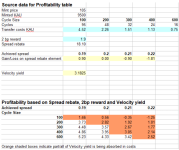
As a general guide, assuming a spread of 20c can be achieved, then the 2bp reward could be equated with covering the costs of the $5 fee.
Assuming a daily mint amount of 9000 KAU, a cycle size of 300 KAU would mean 30 cycles to reach the daily $ rebate limit of $1m.
That's a $150 cost, with the 2bp reward coming in at ~$200 of KAU.

A cycle size of 100 KAU escalates this cost to $450, going well beyond the 2bp reward.

Someone that can consistently beat the spread by a good margin may be able to offset the costs of using small cycle sizes.
It will tend to take longer to achieve the best spreads and small cycle sizes means more cycles. This could result in an unattractive time spent/benefit received ratio (however see also Referrer yield below as a possible offset).

The Profitability table below shows the relationship between Cycle Size and Achieved spread.

1748976578529.png
 
MECHANICS
KAU or USD focus?

The basic mint cycling process is
  1. transfer funds to mint
  2. mint
  3. sell
  4. repeat from 1

For me, the most important balance to focus on maintaining is the KAU balance, regardless of participation in the KMP.
The USD balance is a transitional step needed to participate in the KMP.

Even for those that are usually more focused on their USD balance, it makes sense to shift that focus to the KAU balance while participating in the KMP.
If you consistently leave your funds in USD between minting sessions, then a move up of several % between minting sessions could well reduce the number of lots that you are able to mint in the next session.
If you are a good trader and see an upcoming downswing, then holding USD by exception can also increase your KAU holding.

You will also receive Holder yield on any KAU balances held through midnight UTC.

So, my minting sessions usually start with a sale of KAU at the KM Exchange, prior to step 1 and also usually finish at step 2 on the final cycle.

Some also take this a step further and reverse the cycle.
  • sell
  • transfer funds to mint
  • mint
  • repeat

Each cycle then stands on it's own as a mini mint session, with no need to complete the session in one sitting.
The disadvantage to this approach is that it usually takes longer to transfer funds to mint than it takes for minted KAU to arrive at your KM account. There are also more keystrokes involved.
 
  • Like
Reactions: ROS
Factors that influence the average spread
A certain amount of patience and sometimes a bit of luck is required to achieve an average spread near or below 20c.
The spread is often wider than 20c and can be much wider in volatile conditions.
However, there will be opportunities where it narrows and sub-20c spreads can be achieved.
Volatile conditions can be a bit hair raising, but can also yield very low spreads, mixed with some that go the other way. Different market conditions will suit different personalities.

During a minting session, prices may be relatively flat or be trending down or up.
While an uptrend might initially seem attractive for capturing sub-20c spreads, it may not be all that it seems.

See Spread factors sheet in the spreadsheet Considerations for KMP participation attached further up this thread for the referred to examples.

Strong trend with very small number of cycles.
In the first two examples, I've assumed an account that can reach the daily rebate limit with just 3 cycles. These examples are extreme to illustrate a point.

The first example shows a strong but even uptrend, with prices rising 30c between each step, with the exception of the last minting that's done at the same price as the sell in Cycle 2.
The within cycle spreads achieved look exceptional, coming in at minus 10c each ie beating the rebated spread by a full 30c.

However, when you add up all the mints and all the sells to calculate the average spread, it comes in at double the rebated spread, so you would be significantly down on your KAU holding after receiving the rebate in this case.

The second example shows a strong but even downtrend, with prices falling 30c between each step, with the exception of the last minting, which again is done at the same price as the sell in Cycle 2.
This time, the within cycle spreads achieved look awful.
However, when the average spread is calculated, it comes in at zero, which is a great beat of the 20c that will be rebated.

How to offset the risk of having a blowout average spread?
You may be able to join downtrends or mint cycle when the market is going sideways as a preference when minting, however you are bound to get caught in strong uptrends from time to time.

Increasing the number of cycles can offset the risk of a blowout spread.
This is because the rise is averaged over a larger number of mint-sell trades.
Against this, you have an increased cost from the transfer fees and increased time from doing more cycles, but examples 3 and 4 show the effect of increasing the number of cycles.

The total rise/fall is the same as in examples 1 and 2.

Looking at example 3. Again, we have what look like exceptional spreads within each cycle during the strong uptrend.
The overall average spread is again soberingly poor, but has been offset significantly by increasing the number of cycles to 11 and is nowhere near the blowout that occurred with only 3 cycles.

In example 4, we have what look like poor within-cycle spreads, but the overall average spread is very good.
In practice, you'd probably even be able to improve on those during a drop of that magnitude as there are usually small counter rallies, where the spread tightens.

Others may have looked into the optimum number of cycles, but this is also going to be a balance between available time, the cost of transfers to the mint and your available KAU balance.
 
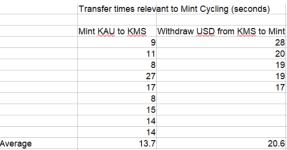
Transfer times
It can seem an agonising wait sometimes between minting KAU and having it appear in your KM account, particularly when you've identified what seemed like a good spread opportunity and seeing it start to evaporate.

So, how long do the transfers take?
This is not a comprehensive data set and I have seen times sometimes quite a bit in excess of these, however it did come from someone sitting next to me with a stopwatch during a minting session, so it is real data.

1748976749078.png
 
Making the Mint and KM trades
You are doing multiple cycles and while doing them blind/without regard for the relative Mint/KM prices is going to get you into trouble, you probably don't have time to wait and wait for each order to fill.
So, while you can use "away from market" limit orders in both the Mint and KM accounts, my guess is that most people will likely use the default of market orders in the Mint and the default of limit orders at the KM Exchange.

Be aware that there are two Confirm buttons to place a trade in the Mint, so if you see a price that you like, you'll need to get the second button clicked quickly. Even then, for a market order, the price may change in that instant.

In the KM Exchange, when your KAU arrives, you'll normally be clicking the Max button to sell it all.
Before this, you can have clicked the Bid button, which will set a soft limit for the order that tracks the current best bid up and down. It only becomes a hard limit for the order after your Place order click is received.

Something to be aware of here is that when the market maker's best bid is getting low (eg single digit thousands of KAU, depending on how many concurrent minters), there is a risk of their order dropping out when exhausted. It is normally replaced fairly promptly, but there is a risk of the soft limit being set to a new best bid some distance below where the market maker was if their bid drops out. If you happen to click Place order at this point, you will get a "below market" fill.

You can invoke hard limit price functionality on the Bid button by double clicking it. When you do this, the current best bid is set as the limit price and it doesn't change when the best bid changes.

I always use limit orders at the KM Exchange, generally at the best bid when I'm happy with the price.
If you do the same, then you will find from time to time that the price drops just as your limit order was accepted,
You will then have an open order shown under Orders.
You can can either leave the order there, hoping it will fill.
Alternatively, if you want the cycle completed, you'll probably want to cancel the order quickly and resubmit at the now lower price.


The last cycle
I generally want all of my funds in KAU after the last cycle.

As soon as I've minted the last but one cycle, I set up the Mint trade for the last cycle.
This shows me the cost of the last minting at the current price.

I then round this up by $50-100 and subtract the remaining funds I have at the Mint.
This is the figure that I want to transfer back to the Mint to complete that last cycle.

I then key that figure into the Total USD in the KM Exchange to sell part of the KAU from the last but one minting.


Transfer USD to the Mint
While you can go via the Menu button to Withdraw USD back to the Mint, there are less clicks involved if you have a tab open on the Assets page, for USD.
 
Charting
The pair XAUUSDG on Tradingview shows the gram price of gold in USD.
Helpfully, this pretty closely tracks the market maker best bid at the KM Exchange.
The TradingView chart has the advantage of saving lines/indicators that you apply to the chart.
 
Equipment/Screen setup
Speed can be of the essence when minting eg take advantage of a good spread, be aware of a change of trend etc, so it helps to have all relevant information visible.

A desktop monitor is ideal, where you can at least have the KM Exchange and Mint pages displayed side by side.
If you are using a laptop, this may not be possible. One possibility in this case is to use a phone and the laptop, with one logged into your Mint account and the other your KM account. The Mint account is only available via a browser, whereas you have the mobile app option with your KM account.

Until recently, I was using a 24" monitor, with two different browsers open side by side.

I had
  • KM Exchange tab on one browser
  • other browser for Mint trade

The following were in non-visible tabs or minimised windows:
  • TradingView XAUUSDG chart
  • Mint reports for Transactions PDF/Account Statement PDF (or KM Transactions for Transactions export)
  • Spreadsheet for monitoring cycles

I've used various methods to keep track of the number of mintings done.
From literal bean counting, to pen and paper to spreadsheet.
Spreadsheet is best as it allows you to adjust/check amounts as well as count cycles.

I've recently upgraded to a 32" monitor.
With this, I have the following windows visible across the screen
  • KM Exchange tab
  • Mint trade
  • TradingView XAUUSDG chart
  • Mint reports for Transactions PDF/Account Statement PDF (or KM Transactions for Transactions export)
  • KM Assets tab showing USD for quicker withdrawals to mint
  • Spreadsheet for monitoring cycles
This setup minimises switching between different browser tabs and keeps everything visible, without having to actively check it.
 
Calculating your achieved spread after a minting session
While it's possible to record everything as you go through the cycles, my preference is to focus on the spread and the cycle count, then use the Kinesis reports to do the calculation after the session is finished.
It doesn't take long to do.


Run the Cointracking export from your KM account.
Find the mint cycle records for the session you want to look at by checking the Date. The session just completed will be at the bottom of the file.

Highlight the relevant records and Sort by Type (column A) and Exchange (column H).
Add a few blank lines above the first Trade and after the last Trade record in the sorted selection.
These should be all of your KMS sells.
If you keep your funds in KAU rather than USD, include the initial sale as that will give a more complete version of your average spread.

Sum the Buy Amount (column B) and multiply the result by 1.0022. This will give the total USD amount received, but with the fees added back ("A").
Sum the Sell amount (column D). Thi will give the total KAU sold ("B").
Divide A by B. This will give the average sell price.


Now go to your Mint account and download the Transactions report for the date of the minting session.
Convert the PDF to Excel format.

Open in Excel.
Sum QTY and multiply by 100. This gives your total KAU minted ("C").
Sum Metal Value of Trade. This gives the total USD paid, exc fees ("D").
Divide D by C. This will give the average buy price.


Your Average spread = Average buy price - Average sell price
As mentioned above, the aim is to get this below 20c.
 
REWARDS

We have now covered most of the nuts and bolts of the process, the costs, rebate calculation and factors that can influence the achieved spread.

So what about the rewards?

In the first week of the month following your minting activity, the yields related to that activity will be paid.
The key ones are
  • Velocity
  • Minter

If you have referred someone who is participating in the KMP, then you will also receive Referrer yield based on the fees that they have generated.
 
Velocity yield
Your entitlement to Velocity yield is determined by the volume of Kinesis Exchange KAU trade fees that you have generated compared to all other Kinesis Exchange KAU trade fees during the month. If you made no Exchange trades in a month, you have no entitlement.

In terms of your KMP activity, then if most of the transaction volume has come from the KMP, then you will receive ~5% of the transaction fees that you've generated as Velocity yield.
In practice, it has been slightly less than this, likely due to KAU trades from non-minters.
Both sides of the Exchange KAU trades benefit from Velocity yield. This includes market makers when they are on the other side of the trade.

In order to keep spreads low, market makes don't pay trading commissions. However their qualifying for the Velocity yield explains why KMP participants receive ~5% rather than ~10% of the fees that they generate.

As an example, if you have minted and sold 9000 KAU for 22 days in a month, then you will have generated
9000 * 22 * 0.0067 = 1326.6 KAU in fees.
You would receive a bit less than 66.33 KAU in Velocity yield.
This is not the actual calculation used, but it provides a rough estimate.
 
Minter yield
Your entitlement to Minter yield is determined by the number of KAU you have minted as a proportion of the total KAU minted. Both of these numbers are the aggregate amounts over time, not just for the month completed.
The calculation is a bit different to this, but you can get a rough estimate by comparing your total minted to the the Minting amount from explorer.kinesis.money.
So, if you started participating in the KMP in May and minted 198,000 (as in the Velocity yield example above), then your share of May's Minter yield allocation would be approximately
198000 / 87,595,484 = 0.226%

The Minters KAU allocation for May was 5370, of which your share would be ~12 KAU,

Importantly, Minter yield entitlement builds as your total minted amount builds.
As an example, if you continued in the KMP during June and minted 9000 per day for 21 days, your minted KAU for the month of June would be 189,000, but your overall total would be 387,000.
If the total minted rose by 20m KAU to 107m, then your entitlement would rise to ~0.36% of a pool ~20% larger (~16m minted in May).

This should give an idea how the Minter yield can potentially build over the duration of the KMP.

After the completion of the KMP, even if it gradually declines as sufficient KAU is being minted to supply circulation increases, your built up entitlement will provide for continuing Minter yield payments.
The level of these payments will be variable and depend on the size of the fee pool each month.
It's possible that the gradual decline in entitlement % could be made up for or more than made up for in KAU terms by increases in the size of the fee pool eg from new products/implementations coming online.
 
Referrer yield
Referrer yield is based on the transaction fees generated by your direct referrals. You receive 7.5% of those.
If your spouse or business has a Kinesis account which participates in the KMP and you were the referrer, you will receive Referrer yield for that account's KMP (and other) activity.

This can provide an offset to the costs for small minters. Costs and potential losses for small minters were described further up this thread.
High costs of KMP activity using small cycle sizes could be made up for by that account's spouse receiving Referrer yield.

Once a participant is comfortable with the mechanics and outcomes of their involvement in the KMP, the Referrer yield incentivises referring others who would be suited to taking part.
The referrer yield from a fully active KMP participant is significant enough to justify the effort involved in getting them up to speed and providing ongoing support in navigating any issues they encounter.
 
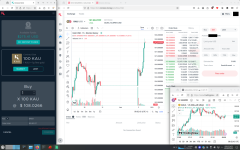
Here is an example how I do my minting on a 24" 1920x1200 desktop. Bigger screen with more space is of course always better, but this works very well for me.

I have configured the TradeView chart window such that it is always on top (option in Firefox), so I can monitor the 1 minute Tradeview chart, the KMS order book and the Mint quote at the same time. For transferring to the mint, that is the asset tab next to the Exchange tab in my browser with USD as selected asset (it has a withdraw button). It is an extra click but no big deal (it takes hardly any time compared to typing in the USD amount). For keeping track of cycles I have an excel sheet (green icon in the task bar). Yes you need to press that to maximize, but the transfer to the Mint takes ~14 seconds anyway so you can use that time for bookkeeping.

Mint_setup.png
 
While I put a fair bit of effort into researching the above, not all of the ideas originated with me.
Thanks to those whose ideas I incorporated.
 
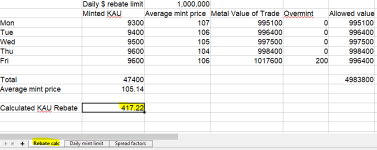
So if I want to mint cycle the maximum each day, how much kau do I need to sell and transfer to the mint to cover my costs?
 
Last edited:
So if I want to mint cycle the maximum each day, how much kau do I need to sell and transfer to the mint to cover my costs?

Depends on the KAU/USD price and how well you do against the spread.
However, you can get an idea from the spreadsheet attached to post #2 in this thread.

Here's a screenshot from it showing the KAU burn that you would have over 5 days of minting the maximum rebate amount.
Add the minimum cycle amount that you'd want to be using on the last day of the week to that burn figure and you'll have arrived at your target KAU amount to have at the beginning of the week.

1749164695497.png
 
  • Like
Reactions: ROS
Transfer times
It can seem an agonising wait sometimes between minting KAU and having it appear in your KM account, particularly when you've identified what seemed like a good spread opportunity and seeing it start to evaporate.

So, how long do the transfers take?
This is not a comprehensive data set and I have seen times sometimes quite a bit in excess of these, however it did come from someone sitting next to me with a stopwatch during a minting session, so it is real data.

View attachment 9332
Thanks Uchiki, this is valuable and no doubt took a lot of time to pull this together. Much appreciation to yourself and others who inputted.

I've found refreshing the mint screen after the transferring from the KMS leads to the funds appearing much faster - at a guess ~8 seconds.
 

Translate

Back
Top