

• Short guides to forum navigation, searching, posting, translation, alerts and notifications viewable by clicking here.
  • Türk dostlarımıza hoş geldiniz Giriş burada.
  • Scammers are running ads on Facebook and Instagram claiming a giveaway. DO NOT OPEN THESE LINKS AND LOG IN. See this thread: here
  • The Kinesis Community Forum will be down starting on Friday, Eastern Standard Time, and is expected to be back online on Monday. Big changes in the backend are coming!

Transaction report for a given calendar year ?

1)
I can sort of do a screen-scrape here:
https://kms.kinesis.money/assets/transactions

You sort of select 2 dates in sequence and somehow this magically fixes a date range. Not at all obvious.

Then manually carefully paging through the relevant pages.
Doing a control-A control-C, control-V appending into a text file each time

There's got to be a better way surely?

2)
I am playing with this:

1733312019340.png

Oh I see!
Very fiddly.
The dates do actually stick.
Jeepers
Documenting here in case this is useful to other users.
I have no idea how I did a from-date, to-date
but it does seem feasible after all.
So I've answered my own question
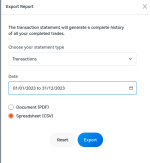
1733312106399.png

That generates something like:
more Transactions_Statement_KM12345678_01_01_2023_31_12_2023.csv
which is exactly what I wanted

Holdings report also works
more Holdings_Statement_KM12345678_31_12_2023.csv
In Zürich, we have wealth tax to pay so I have to get that right.

Fiddly but they both work.
Answered my own question but this should be useful for others if it hasn't been documented already.

OK back to my tax
It's going to be fun now that I have CSV files to play with (data! yay). No more of that fiddly Clickodrome/ Mouse stuff. Yuk
 
Last edited:

Transaction report for yields​

yields apparently are not written to the transactions report documented in last post.
If you file for income tax, you may want to look at the code below.

copy/ paste the data manually from this page:
https://kms.kinesis.money/yields/payments

Starting point from the 3 vertical dots on the right of your screen

Do not forget to page down after adjusting to max pagination of 50 because hey why automate this. Nobody files tax returns right?
control-A control-C control-V to some flat file
This meant just 2 pages for me for Calendar 2023

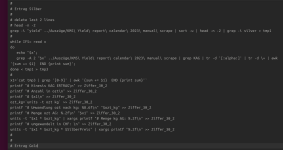
Let me insert a photograph (aka a print-screen) of my code (linux bash script hack) to sum the 4 types of yield for (KAG, KAU). YMMV. I have to do this to avoid being put on the naughty list (logon blacklist).

SilberPreis in the code is price per kg in CHF. Set by Bern, the central government body here.

"KMS Yield report calendar 2023 manual scrape" is my flat file

The main trick in the code is extracting the 2 lines after the matching string ("grep -A 2" is wot does it). If the Kinesis user interface changes,this part of the code will have to change as well. So beware.

1733393955840.png

Then you do the same for KAU.
Not pretty. But it automates what would otherwise be tedious manual work.
 
  • Like
Reactions: ROS
yields apparently are not written to the transactions report documented in last post.
If you file for income tax, you may want to look at the code below.
The cointracking CSV is the all encompassing report for bookkeeping. Not only does it include all the details, but there is API integration or the manual option. Some work is still being done to improve how things are "typed" from Kinesis into Cointracking
 
The cointracking CSV is the all encompassing report for bookkeeping. Not only does it include all the details, but there is API integration or the manual option. Some work is still being done to improve how things are "typed" from Kinesis into Cointracking
Indeed.

The Transactions report only contains trades and will give you a record per part match if they occurred, whereas the Cointracking report will give you one summary trade that includes any part matches.
It also gives you the Income records, and any transfers in and out of the KM account.
 
The cointracking CSV is the all encompassing report for bookkeeping. Not only does it include all the details, but there is API integration or the manual option. Some work is still being done to improve how things are "typed" from Kinesis into Cointracking

The Transactions report only contains trades and will give you a record per part match if they occurred, whereas the Cointracking report will give you one summary trade that includes any part matches.
It also gives you the Income records, and any transfers in and out of the KM account.

Kewl. Thank you for the correction
Truthfully I hadn't opened it. Duh.

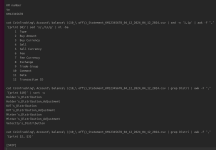
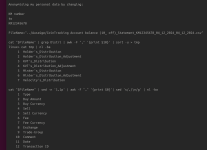
After tweaking out my personal data, here's how a linux user could begin to work with that CoinTracking report:
1733443973739.png
 
Just to be thorough,

I get the same result as with the code photographed in my first post in this thread for total yields for Calendar 2023 using the code in the 2 pix attached, reading directly from the CoinTracking CSV file.

I used to upload this stuff to my github but I'm out of practice at the moment with other priorities:
 

Attachments

  • Screenshot from 2024-12-06 03-31-00.png
    Screenshot from 2024-12-06 03-31-00.png
    79.1 KB · Views: 4
  • Screenshot from 2024-12-06 03-31-19.png
    Screenshot from 2024-12-06 03-31-19.png
    93.9 KB · Views: 4
Actually it ain't that difficult. So I just done it (uploaded bash source code to github to spare othes the pain of reading code from photographs of code in the future!).

here
and
here

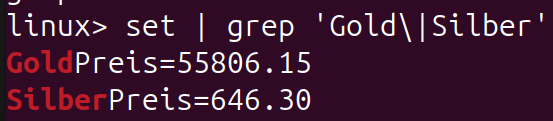
Silver price per kg assigned by the Bund in Bern for EOY 2023. Calendar years in Switzerland.
here
Silber1 kg=646.30CHF
Gold1 kg=55’806.15CHF

All personal data hopefully removed before uploading.
 
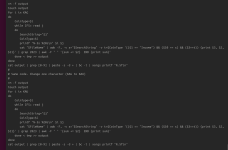
Final version much simplified.

This reads the CoinTracking CSV file.
Pulls out data from the income fields
Adds them up
Then does stuff to give a total income number for KAG/ KAU for the local cantonal tax authorities here.

This might conceivably be useful for others even in completely different jursidictions.

As usual I use completely free tools (units, bash script, awk, bc and so on). A savvy linux techie user should have no problem adapting this for their own use.

Oh outside this program, I set these bash 2 symbols according to how the Swiss authorities see the price of the 2 metals at EOY(2023) in CHF per kg. This is mainly oriented towards the wealth tax filing.

Tabs are all over the place. Normally I tab at 4 characters. github does strange stuff. One day I might do an "expand -4 filename" prior to uploading. Not now. I've done enough. I'm already 3 weeks late on this filing. Oops.

1734454556906.png
 

Translate

Back
Top