

• Short guides to forum navigation, searching, posting, translation, alerts and notifications viewable by clicking here.
  • Türk dostlarımıza hoş geldiniz Giriş burada.
  • Scammers are running ads on Facebook and Instagram claiming a giveaway. DO NOT OPEN THESE LINKS AND LOG IN. See this thread: here
  • The Kinesis Community Forum will be down starting on Friday, Eastern Standard Time, and is expected to be back online on Monday. Big changes in the backend are coming!

Overview and How To Videos on the Kinesis System

Part 1 -- System Overview

Dashboard Overview


Exchange Overview​


Differences between buying KAG/KAU from Mint vs Exchange​


Overview of Kinesis Currencies​


Simple Troubleshooting for Browser Based Login Issues​

 
Last edited:

Part 2 -- How to use Kinesis Exchange

How to Deposit​


How to Withdraw​


How to Buy Gold and Silver​


How to Trade Currencies​


Supported Networks​


Last edited:
Overall, this is a very good set of videos to handhold people through different aspects of the Kinesis Monetary System.
It should be possible to add to the set over time as new features are introduced.

Great idea to have them presented by established Account Execs.
 
Is there a way to pin these, or as permanently unread, so they are always in the current output and not buried?
 
  • Like
Reactions: ROS
Have a question: Since joining I have been using the echange with limit orders for most of my transactions but lately I've tried the "market" pane for a few trades and it was pretty efficient. I believe its the same as setting a limit order at the current bid/ask price on the main exchange, is this correct?
Any caveat or details I should know about using this method Vs the other?
 
Last edited:
Have a question: Since joining I have been using the echange with limit orders for most of my transactions but lately I've tried the "market" pane for a few trades and it was pretty efficient. I believe its the same as setting a limit order at the current bid/ask price on the main exchange, is this correct?
Any caveat or details I should know about using this method Vs the other?
No, it's not the same. A market order fills your order with whatever is available. That means when there is a solid bid (when selling) or ask (when buying), you'll be fine. This is usually the case with KAU and KAG. However, in a thin market you risk getting a terrible price, because you basically accept any price available.

What people often overlook is the depth of the orderbook. For example you want to sell and the bid price is reasonable. But there may be only a very small amount available at that price, and when they are gone you are selling into the next (lower) bid. And when that's gone... etc etc.

What I usually do if I want to buy or sell NOW, is put in a limit order with a limit that is slightly worse than the current bid/ask. This way the order is executed directly while you still have a safety net in case some glitch happens.
 
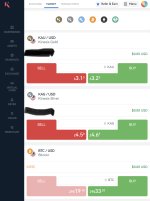
Trog, just so we understand each other, I do not mean making a trade at "market" price on the exchange Vs a limit trade, but using this window instead of the main page:

IMG_6232.jpeg

Which you mean to say is automatically done at market only?
 
Trog, just so we understand each other, I do not mean making a trade at "market" price on the exchange Vs a limit trade, but using this window instead of the main page:

Which you mean to say is automatically done at market only?
I would also think it's a market order since there is no indication of market depth. I've never run a critical test.
 
Trog, just so we understand each other, I do not mean making a trade at "market" price on the exchange Vs a limit trade, but using this window instead of the main page:

View attachment 3822

Which you mean to say is automatically done at market only?

Ah! That's what you meant. I'm not sure since I have never used this interface myself. I have always assumed it does market orders, but I'm not sure if it just enters a market order (displayed price only for reference) OR a limit order at the price that is displayed.

Good question! Now I would like to know it too!
 
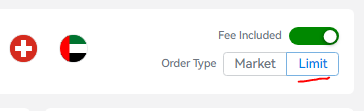
If you look to the top right of the page, there is a Market/Limit indicator, which defaults to Limit.

1690114597002.png

Provided Limit Order type is selected top right, I think that a limit order will be created at the best bid/best ask - pretty much the same as on the standard Exchange screen if you have Limit Buy/Limit Sell selected, but then click on Ask Price/Bid Price.
 

Translate

Back
Top